VMware: Host Baseboard Management Controller status
Last week I received some warnings at some HP Proliant DL380 G7’s, the warning message:
Host Baseboard Management Controller status
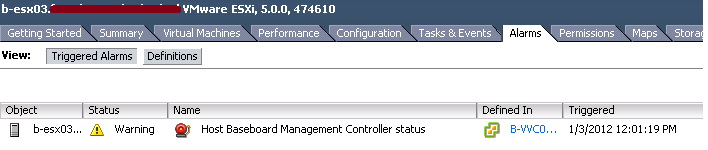
The HP branded VMware vSphere 5 installation (build 474610) detected that my colleague disconnected the UTP cable at the ILO interface.. okay.. good to know
If you don’t use ILO (not recommended) you can disable the ILO interface at the ILO bios
Global iLO 3 Settings:
Lights-Out Functionality [DISABLED]
iLO 3 ROM-Based Setup Utility [DISABLED]
Require iLO 3 RBSU Login [DISABLED]
Show iLO 3 IP during POST [DISABLED]
About Author

Yes. ESXi 5.0 has a LOT more features, especially monitoring.
For me, upgrade ESX 4.0 -> ESXi 5.0 adds Power Meter (in watts) on Dell PE R610, temperatures and many more..
but production is still on slow ESX 4.0… 🙁
do we have to recreate VMFS datastores when upgrading from ESX 4.0 to ESXi 5.0? we use NetApp filers……
@TooMeeK
No, you don’t have.
1. You can use existing VMFS3 datastores with ESXi5 hosts
2. You can upgrade VMFS3 datastores to VMFS5 online without any downtime
Hi,
Where did you find the HP branded ESX 5.0? i cant seem to find it anywhere, we are looking to purchase essentials Plus but we mainly use Hp servers, a hp branded setup would be nice!
You can download this version from the HP website, here’s the url:https://h20392.www2.hp.com/portal/swdepot/displayProductInfo.do?productNumber=HPVM09
Product #: HPVM09
Version: 5.0 and Updates
Software specification: 5.0 Oct 2011 ESXi HD-USB-SDImgeInstlr (Z7550-00253.iso)
5.0 Oct 2011 ESXi Release Notes (616895-005.pdf)
5.0 Oct 2011 ESXi Getting Started Guide (616896-002.pdf)
After you installed this version, don’t forgot to add you’re own license because this version is limited
Good luck!
Echte rijkdom zou de rijkdom voorwetenschap .
Geluk zal niet afgeleid zijn van het doen van eenvoudig werk, maar uit je nagenieten van tevredenheid die komt na de verwezenlijking van de strijd die ons uiterste best geëist.
Hello.
We’re running ESXi 5.0.0, 623860 from a special package for HP (VMware-ESXi-5.0.0-Update1-623860-HP-5.20.43.iso) on a HP DL380 G7 and we didn’t see any occurence of iLo in our vSphere Client! :\ although our iLO is registrated.
I don’t figure why? Can you help me?
ps: via SSH i can acces and set the configuration of iLo with hponcfg what is coming with the special package from HP.
@Mick
We are running several HP DL165 G7’s with a mix of ESXi5.0 to ESXi5.1 versions, all with the standard iLO license (ie. we have not added the Advanced iLO license features), and while I can access the iLO vi http and ssh, likewise they fail to show up in the vSphere client, but worse for us is that the hponcfg utility in the esxi shell complains it cant find the iLO device:
/opt/hp/tools # ./hponcfg
HP Lights-Out Online Configuration utility
Version 4.0-10 (c) Hewlett-Packard Company, 2011
ERROR: Could not find the Management Processor Device Node.
Please check if the iLO driver module is installed and running properly.
ACTION REQUIRED: Install/Re-install hp Lights-Out driver package(‘hp-ilo’ RPM) for iLO.
Anyone have any ideas ?
Please let me how to get and set the BMC IP of the ESXI 5.0 VMware server.
Please let me know to get and set the BMC IP of the ESXI 5.0 VMware server.